Every exam portal upload error, what it means and how to fix it
The upload errors Indian exam portals actually show, what each one is really checking, and the fix for each. Including the two that almost nobody expects.
Exam portals reject an upload with one line and no explanation, and the line they choose is often not the rule that failed. This is every message we have seen, what the portal is actually checking when it shows it, and what to do about it.
If you only read one thing: the rule that fails most uploads is the pixel dimensions, and almost nobody checks it, because the error message usually talks about size in KB. The second is a minimum KB, which catches people who have done everything else right.
| What the portal says | What it means | Fix |
|---|---|---|
| Photo size should be between 20 KB to 50 KB | This message means your photo is outside a range, not simply too big. | How to fix it |
| Invalid image dimensions | This error is about width and height in pixels, not KB. | How to fix it |
| File size exceeds the maximum limit | Your file is over the ceiling. | How to fix it |
| Invalid file format. Please upload JPG/JPEG only | Portals read the bytes inside the file, not the extension on the end of its name. | How to fix it |
| Signature size should be between 10 KB to 20 KB | A signature is a few dark strokes on white paper, which compresses to almost nothing. | How to fix it |
| Photo not uploading | When the portal refuses the file and says nothing useful, check the rules in the order they actually fail. | How to fix it |
| File size is too small | Forms set minimums as well as maximums. | How to fix it |
| Image dimension should be 200 x 230 pixels | 200 x 230 is the photograph size IBPS, SBI and several state recruitments use. | How to fix it |
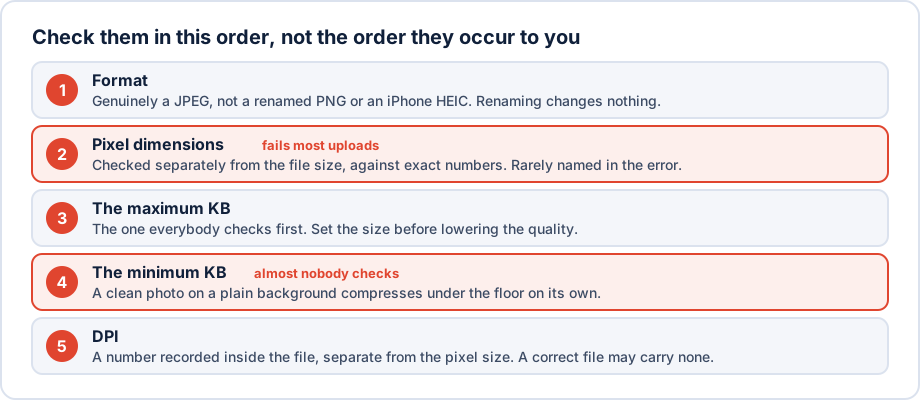
Work through it in this order
When the portal will not say what is wrong, check the rules in the order they actually fail rather than the order they occur to you.
- Format. Is it genuinely a JPEG, not a renamed PNG or an iPhone HEIC? Nothing else matters until this is right, and renaming the file does not fix it.
- Pixel dimensions. Checked separately from the file size, against exact numbers. Right KB with wrong dimensions fails identically to wrong KB.
- The maximum KB. The one everybody checks first. Resize before compressing, or the file will be valid and ugly.
- The minimum KB. The one nobody checks. A clean photo on a plain background falls under it on its own.
- DPI. A number recorded inside the file, separate from the pixel size. A correctly sized file can carry none at all.
The rejection checker tests all five at once against the numbers your notification gives, and names the ones that fail. It reads the file in your browser and changes nothing.
Questions
Why does the portal not tell me which rule failed?
Most of these portals show one generic message for several different checks. The message you get is frequently about file size even when the dimensions are what failed, which is why compressing the photo again so often changes nothing.
My file is inside the KB range and still rejected. What now?
Check the pixel dimensions, then the format. Those are the two rules a size-shaped error message hides most often. The checker tests both against your own numbers.
Can a file be rejected for being too small?
Yes, and it is common. SSC, IBPS, SBI and CTET all set a floor as well as a ceiling. A clean photograph compresses well below it, and CTET sets a 3 KB floor for signatures that a tidy signature falls under almost every time.
Does renaming a PNG to .jpg work?
No. The portal reads the bytes at the start of the file, not the extension. A renamed PNG is still a PNG and is refused as an invalid format.